AI Training Modules for Students
The AI training modules for students are online, asynchronous, and interdisciplinary modules that aim to equip students with the knowledge and skills to navigate the AI landscape in their academic and professional careers. Created by a group of faculty consultants and CTL staff members, these modules cover fundamental ideas including how AI works, its ethical implications, significance for academic integrity, and specific student applications of AI with consideration to these areas. The modules are available in D2L for all faculty, and they can be used all at once or in pieces to fit the needs of individual classes.
Learning Outcomes
The AI training modules for students were designed for the following learning outcomes, each of which corresponds with a specific module.
- Explain the core details of how artificial intelligence works and compare different types and models of AI.
- Examine the role and consequences of academic integrity within a variety of AI use cases to evaluate issues related to authorship, attribution, intellectual property, and responsible AI use.
- Assess the ethical implications of AI to make informed choices about AI use across local and global settings.
- Adapt AI tools and strategies for appropriate academic and professional use.
Overview Video
Module Structure
Each module addresses a distinct area for AI literacy. While the modules are scaffolded and can be used to build upon each other in order, they can also be used discretely depending on the needs of specific courses.
The modules consist of a combination of written content and interactive activities to help students apply their knowledge and achieve the learning outcomes.
The modules use the following structure:
-
Foundations of AI: This module explains how AI works and how AI models are trained so that students can understand and differentiate between the types of AI and define related concepts. Students will investigate how AI is used in real-world situations and learn what effective AI prompting looks like.
-
Academic Integrity: This module defines how AI fits into DePaul’s academic integrity policy to help students navigate the varying AI policies implemented in their courses. Students will learn how to cite and disclose their use of AI, if it is permitted in their classes, and they will gain clarity around how AI detectors work and what to do if their work is flagged.
-
Ethical Considerations of AI: This module explores the multitude of ethical concerns that are raised with AI use. Framed as "Rights to Protect" and "Responsibilities to Fulfill", each concept in this module raises questions for students to evaluate as they think about the effects of AI on various personal and professional sectors.
-
Using AI as a Student: This module provides practical applications for AI in academic and professional settings. With consideration to the concepts of the previous modules, the content in this module will equip students with actionable strategies for effective and responsible use of AI.
Using the Modules in Your Course
Instructors will be able to add a link directly to the AI training modules in D2L. This link will give students access to all modules.
To review the modules before sharing them with students, instructors can
add the link to a sandbox course or to a hidden module within a course.
Note: To preview the modules, instructors can select the link once
added to a course. This will open a different version of D2L, in which the modules are housed. When finished viewing the modules, instructors and students will need to log out and then log in again to
https://d2l.depaul.edu to continue working in D2L.
Instructors are free to give students specific modules to complete, but it is recommended to encourage students to review all modules.
Completion will be logged within the AI training modules and sent back to D2L in the form of a grade item for proof of completion.
Adding the Modules to a Course
Adding the modules to a course involves adding a link within the Content of a course. To review the modules before sharing them with students, instructors can add the link to a sandbox course or to a hidden module within a course.
- Navigate to the course in which to add the Student AI Training Modules.
- If adding to an existing module, select that
module to open it. Otherwise,
follow the steps to create a module in which to house the Student AI Training Modules.
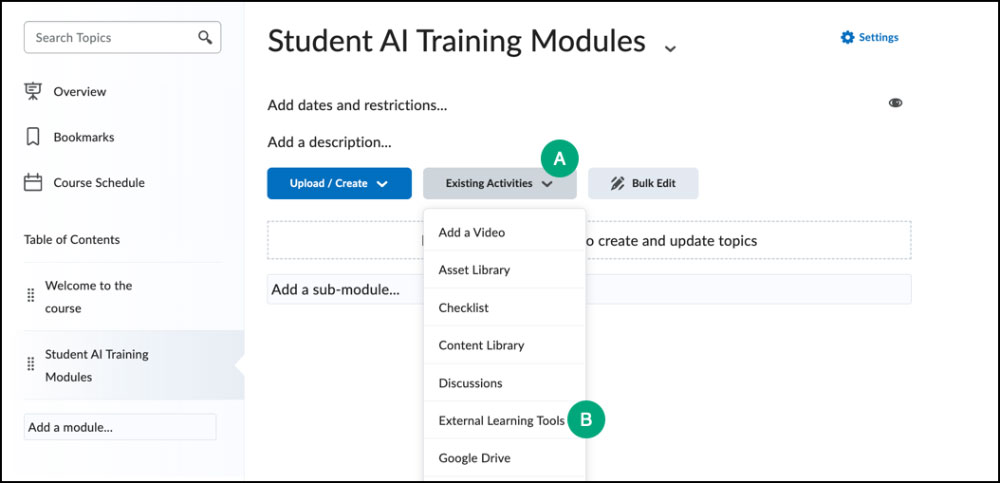
- Within the module, select
Existing Activities [A].
- Select
External Learning Tools [B].
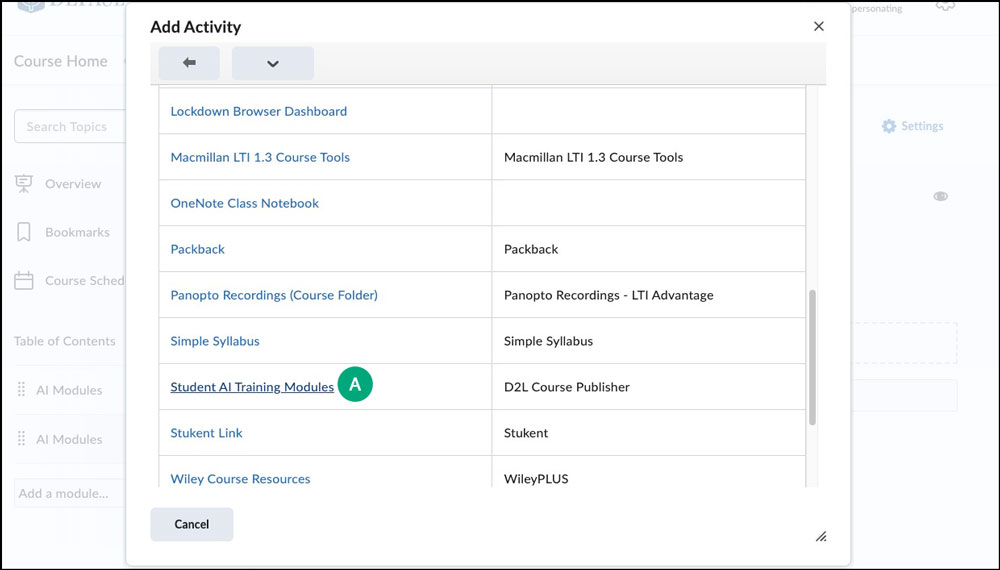
- Select
Student AI Training Modules [A]. The module will refresh and a link will appear.
- To view the modules, select the
link in the module. A new page will open with the modules on display.
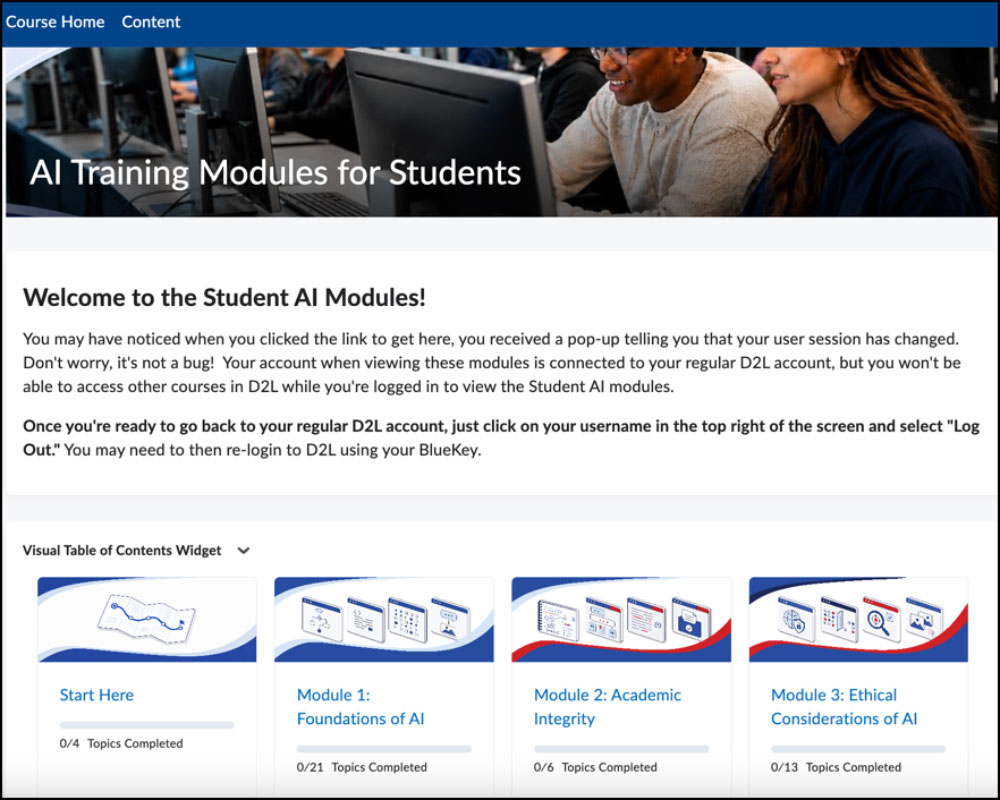
- Select
Start Here or any of the modules to preview the content.
Note: When finished viewing the modules, instructors and students will need to log out and then log in again to
https://d2l.depaul.edu to continue working in D2L. This is necessary each time the modules are accessed due to a technical limitation of the system.
Viewing AI Module Grades
Once a student has completed all pieces of a module (including viewing the pages, marking pages complete, and completing any activities) they will submit a confirmation that they have completed the module. At this point they are awarded a Pass grade.
Grade items will be created automatically in a course once the first person clicks the link to the student AI modules.
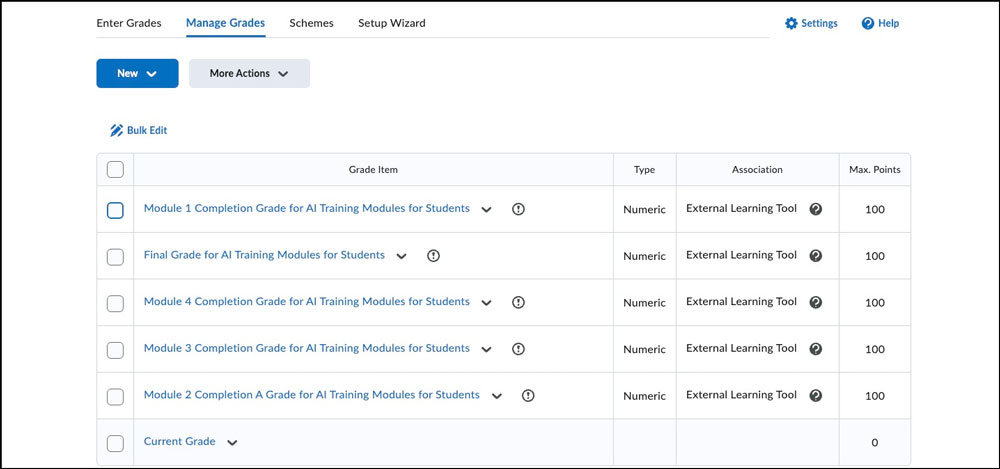
These grade items will update automatically as students complete the content.
Managing Grade Item Visibility
By default, the automatic grade items are visible but excluded from the final grade calculation. These grade items cannot be removed due to at technical limitation of the setup, but instructors can hide them from students.
- Go to
Grades within the course.
- Select
Manage Grades.
- Select the
checkboxes for any or all of the five grade items: Module 1 Completion Grade, Final Grade, Module 4 Completion Grade, Module 3 Completion Grade, and Module 2 Completion A Grade [A].
- Select
More Actions [B].
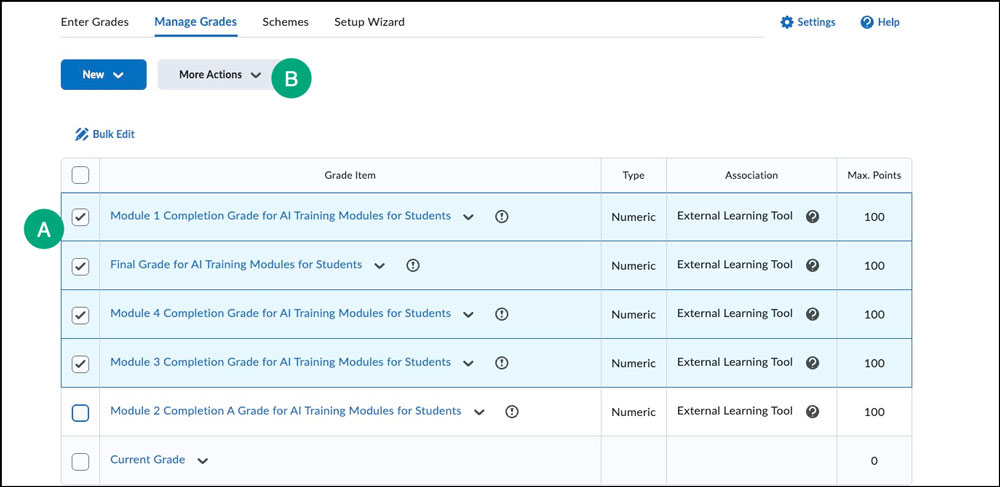
- From the dropdown list, select
Hide from Users.
Managing Grade Item Value
By default, the automatic grade items are visible but excluded from the final grade calculation. Instructors can add value to all or specific modules so they count towards the final grade.
Note: It is recommended to keep the "Final Grade for AI Training Modules for Students" excluded from final grade calculation. This grade item drops any activities that have not been completed, so it may not accurately represent what students have completed.
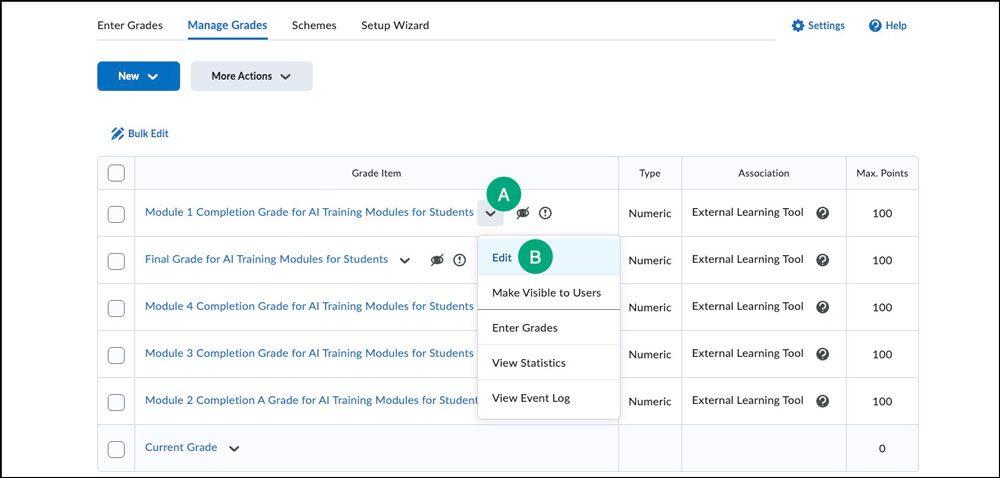
- Select the
dropdown arrow next to the grade item [A].
- From the list that appears, select
Edit [B].
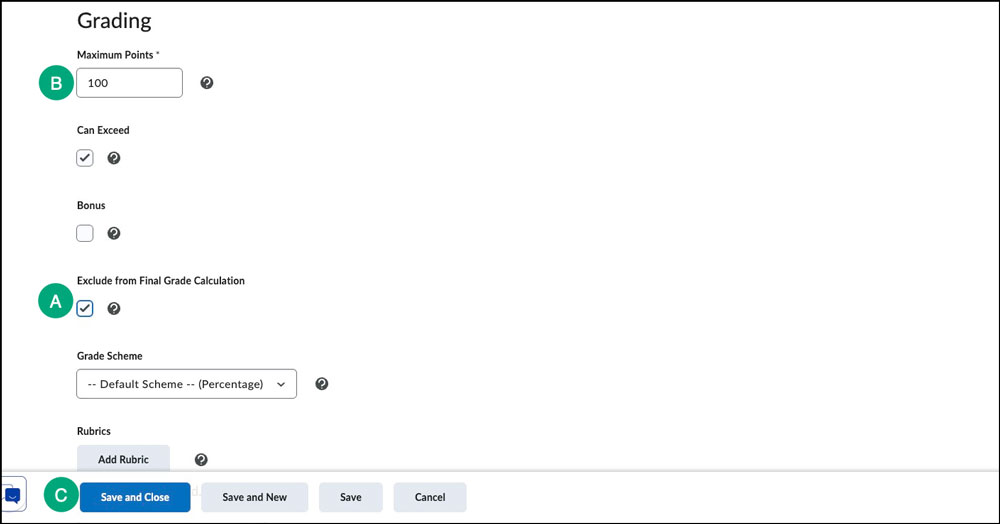
- Deselect the
checkbox next to "Exclude from Final Grade Calculation" [A].
Note: Weighted gradebooks will not have the "Exclude from Final Grade" option. To add value to a module activity in a weighted gradebook, modify the
weight of the grade item on this page.
- (Optional) Modify the default point value [B].
- Select
Save and Close [C].
If a student has already completed a module for another course, their completion grade will automatically be sent to the gradebook once they select the link again. This is designed to prevent students from having to repeat the content for multiple courses while providing the instructor with proof that the student did complete the module(s).